First Day, Back to School Quotes: Celebrate the New School Year with Style
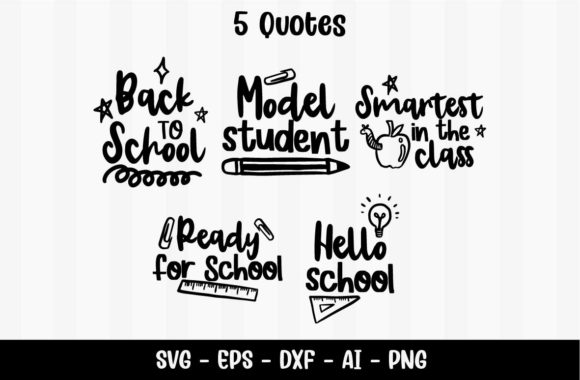
The first day of school is a milestone that deserves more than a simple snap and a sigh of relief. It is an opportunity to set the tone for the months ahead, to spark excitement, and to create a sense of belonging. For educators, parents, and creative professionals alike, the right visual cues can transform a plain classroom or a modest home workspace into a welcoming environment that encourages learning and positivity. That is where a thoughtfully designed set of quotes comes into play. The First Day, Back to School Quotes collection offers five distinct, illustration-rich phrases that are purpose-built for this moment. Each quote comes with a cute graphic — a pencil, a desk clip, an apple, a linear design, or a lightbulb — and is available in PNG, SVG, EPS, DXF, and AI formats. Whether you are a teacher decorating a bulletin board, a small business owner creating custom stickers, or a parent crafting a keepsake, these files are incredibly versatile. However, like any digital resource, their true value depends on how you use them. Many people jump in without considering common pitfalls that can turn a promising project into a frustrating experience. Let us look at the most frequent mistakes — and how to avoid them.
Choosing the Wrong File Format for Your Project
It is easy to assume that any of the included formats will work equally well for any task. But that assumption often leads to pixelated prints, cropped edges, or hours of wasted editing time. The First Day, Back to School Quotes bundle provides PNG, SVG, EPS, DXF, and AI files for a reason: each format serves a specific purpose. The PNG files are raster images with a transparent background, ideal for quick digital use or for layering onto solid backgrounds. The SVG, EPS, DXF, and AI files are vector-based, meaning they can be scaled infinitely without losing quality. If you plan to print a large wall poster, using a raster PNG that is too small will result in blurry text and jagged illustrations. Conversely, if you intend to place the quote on a colored surface, a vector file that lacks proper outline handling may cause cutting issues with a vinyl plotter. The fix is simple: always match the format to your final output device and medium. For screen displays and small stickers, PNG is often sufficient. For large-scale prints, laser engraving, or precision cutting, choose a vector format such as SVG or AI. If you are unsure, start with the vector files — you can always export a PNG from them, but you cannot reliably enlarge a raster PNG without degradation.
Overlooking the Importance of Transparent Backgrounds
A detail that many first-time users miss is whether the illustration’s background is truly transparent. The PNG files in this set include transparent areas, but when you open them in a basic image viewer, they may appear against a white or gray checkerboard. If you then place the quote onto a colored wall or a patterned paper, the original background may show up as an unwanted white box. The same issue can arise with vector files if you inadvertently import them with a default fill. Always preview your file with a dark or contrasting background before finalizing your layout. In design software like Canva, Photoshop, or Illustrator, you can toggle the transparency grid to verify that the pencil, apple, or lightbulb appear cleanly without a backplate. If you see a solid white or any color rectangle, check the file’s layer settings or look for a clipping mask. A clean transparent background is one of the most valuable features of this bundle, and using it correctly ensures a professional finish whether you are making classroom name tags or scrapbook accents.
Ignoring the Scale and Proportion of Illustrations
The five illustrations — pencil, desk clip, apple, linear shape, and lighting bulb — are designed to complement the quotes, but their relative sizes may not be what you expect. If you drop the “Model Student” quote onto a 12×12 inch card without adjusting the scale, the apple icon might dominate the text or the lightbulb might look tiny beside bold lettering. Beginners often leave the illustration at its default size, which can throw off the visual balance and make the piece feel amateurish. Take a moment to assess proportions. A linear design may work perfectly as a subtle border element, while a large pencil could serve as an impactful accent on a poster. Resize the illustration so that it supports the quote rather than competes with it. For example, if you are creating a sticker for a pencil case, the pencil icon could be enlarged as a playful backdrop. On the other hand, for a desk plaque, a smaller, centered lightbulb might be more appropriate. Experiment with scaling in your design software until the composition feels deliberate. The vector formats make this easy because you can enlarge or shrink the graphic without any loss of detail.
Misunderstanding the Licensing and Usage Rights
Even though the First Day, Back to School Quotes set is marketed for wall art, classroom decor, and creative projects, the exact terms of use can vary. Some digital files come with restrictions on commercial use, quantity limits for printed items, or prohibitions on reselling the digital files themselves. A common mistake is to assume that because you bought a product, you can use it any way you like — including selling prints in an Etsy shop or incorporating the graphics into a logo for a school district. Before you download, read the seller’s license carefully. Look for phrases like “personal use only,” “commercial use allowed,” or “extended license required.” If the product does not specify, contact the creator. Many professional designers and educators inadvertently violate terms because they did not check. To stay safe, keep a copy of the license in your project folder and respect the limits. If you plan to use the quotes as part of a product you sell, confirm that commercial use is permitted, and if it is not, look for an extended license or reach out to the artist. This simple precaution protects you from legal headaches and supports the creators who make these resources available.
Neglecting Print Testing and Material Compatibility
Digital files look crisp on your screen, but once they hit a printer, the results can be disappointing. Color shifts, low contrast, or poor adhesion to certain surfaces are common issues. Many users skip a test print and go straight to a full run, only to discover that the lightbulb graphic loses its detail on a matte paper or that the pencil shadow vanishes on a dark background. Always perform a small test print on the same material you intend to use for the final project. Check the alignment, color accuracy, and whether the transparent background behaves as expected on your chosen paper or vinyl. If you are using a cutting machine like a Cricut or Silhouette, also test the cut settings with a scrap piece of material. The DXF and SVG files in the set are prepped for cutting, but blade depth, pressure, and material type all affect the result. Adjust the design’s stroke thickness if needed — sometimes thin lines from the linear illustration need a slightly heavier outline to cut cleanly. Investing five minutes in a test can save you from wasting expensive paper or adhesive sheets.
Overcomplicating the Design Layout
With five cute illustrations and five positive quotes, it is tempting to use every element in a single project. Some people try to layer the pencil, desk clip, apple, linear shape, and lightbulb all around one phrase, creating a cluttered, messy look. While the individual graphics are charming, overcrowding them defeats the purpose of a clean, inspiring message. Less is often more. Pick one illustration that matches the quote’s energy. For “Smartest in the class,” the lightbulb is a natural fit. For “Ready for school,” the pencil conveys preparation. The linear pattern can serve as a subtle underline or border. If you want a multi-quote display, arrange them separately — for example, five individual smaller prints in a gallery wall, each with its own icon. This approach maintains visual clarity and allows each sentiment to stand out. Overloading a single design not only looks busy but also reduces the impact of the words you are trying to celebrate.
Failing to Back Up or Organize the Files
After downloading, many people leave the files in a single zip folder on their desktop, never sorting them by format or type. Months later, when they need the SVG for a new project, they cannot find it or they accidentally use the wrong version. This disorganization leads to frustration and wasted time. Create a dedicated folder for the First Day, Back to School Quotes set with subfolders labeled PNG, SVG, EPS, DXF, AI. Rename each file with the quote and illustration name, such as “Welcome_Back_Pencil.ai” or “Hello_School_Lightbulb.png.” Also, keep a separate backup on a cloud drive or external hard drive. Digital files can be corrupted or accidentally deleted. By organizing now, you ensure that the cute apple or linear design is always just a few clicks away, ready for last-minute classroom decorating or a new small business sticker run.
Conclusion: Celebrate with Confidence
The First Day, Back to School Quotes are more than just decorative text — they are a tool for building connection, motivation, and joy around the start of the school year. By understanding file formats, respecting transparency, scaling thoughtfully, checking licenses, testing materials, simplifying layouts, and keeping files organized, you can avoid common setbacks and make the most of these resources. Whether you are a teacher preparing a welcoming bulletin board, a parent making a keepsake for your child’s first day, or an entrepreneur creating products for fellow educators, a little upfront attention to detail ensures your final project looks polished and professional. So download your set, choose your favorite combo of pencil, desk clip, apple, linear design, or lightbulb, and get ready to celebrate the new school year the right way.